WooCommerce AI chatbot

An AI chatbot for WooCommerce that actually knows your store.

FlowPilot answers your customers 24/7 using your real products, prices, stock and orders. It replies in their language, tracks orders securely and passes the conversation to you when a person is needed. Setup takes a few minutes with the WordPress plugin.

No card needed · 100 AI conversations included in the trial

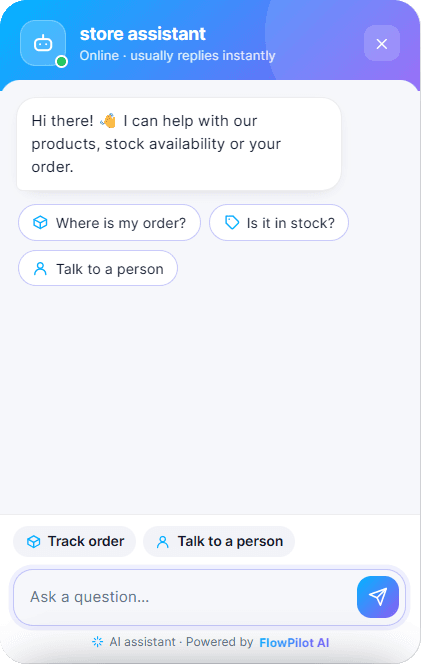
FlowPilot chat window on a WooCommerce store answering a stock question

Why a generic chatbot isn't enough

Most chat widgets either wait for you to reply or answer from a short FAQ you wrote once. Store customers ask concrete questions: “Is this in stock in size M?”, “How much is it?”, “Where is my order?”. A useful WooCommerce chatbot has to answer those from live store data, in the moment, without making things up. That is the only thing FlowPilot is built for.

What it does

Answers from your real catalog

The chatbot reads your WooCommerce products, prices and stock, so it can say “Yes, the blue vase is in stock, 129 USD” instead of a vague “please check the product page”. Prices are always given in your store's currency.

Order tracking without a login

Customers type their order number and the email they used. Both are checked together, so nobody can look up someone else's order. If your order has a tracking number, the chatbot shows the carrier link.

Replies in your customer's language

Someone writes in German, they get an answer in German. Spanish, French, Turkish, Arabic and many more work the same way. The chat window itself is available in English, Spanish, French, German and Turkish.

Hands off to a human

When a customer wants a person, they leave their name and email or phone. You get an email right away, and the full conversation is waiting in your dashboard, so you don't have to ask the same questions again.

Low-stock and order alerts

On Pro and Store+, you can get an email when a product is running low or a new order comes in, so you know what customers are asking about and what is selling.

Your brand, your colors

Pick the window title, color and light or dark look from the dashboard. Changes go live on your site without touching code.
Set up in three steps

  1. Install the plugin

    Install the free Aislebot plugin from WordPress.org and click “Connect to Aislebot”.

  2. Approve the connection

    Sign in, approve, and confirm the access screen WooCommerce shows. API keys are created for you; you don't copy anything.

  3. The chatbot is live

    The chat window appears on your store. Ask it about one of your products to see it answer from your catalog.

Simple pricing

Starter$19 / month300 AI conversations · 1 store
Pro$49 / month1,500 AI conversations · 2 stores
Store+$129 / month5,000 AI conversations · 10 stores

Prices in USD; EUR and TRY are available at checkout. Save about 16% with yearly billing. 30-day refund.

Questions store owners ask

Does it work with any WooCommerce theme?

Yes. The chat window is added with a small script and is isolated from your theme's styles, so it looks the same on any theme and does not break your layout.

Can the chatbot get things wrong?

It answers from your live product data and is told not to guess prices or stock. Like any AI, it can still misread an unusual question, which is why every conversation is saved in your dashboard and customers can always ask for a human.

Does it see my customers' payment details?

No. It only reads products, stock and the basic status of an order (after the customer proves it's theirs with the order number and email). Card data never passes through FlowPilot.

What happens after the free trial?

You get 14 days and 100 AI conversations to try it. No card is needed to start. If you don't choose a plan, nothing is charged: your account moves to the free plan with no time limit, 75 AI conversations a month for 1 store.

Can I try it before installing anything?

Yes. On the live demo page you type your store's address and chat with an assistant that already knows your public products and prices. Nothing is installed on your site.

Is there a refund policy?

Yes. If you're not happy within 30 days of paying, you get a full refund, no questions asked.

See it answer your products.

Type your store address on the demo page. No install, no sign-up.

Open the live demo